
Wireless Reverse Charging
MasivappLibraries & Demo
3.8225.00 Reviews
- Version
- 13.0
- Installs
- 500.00K
- Age Rating
- Everyone
Screenshots
Our Review of Wireless Reverse Charging
 Analysis by Appyee
I tested Wireless Reverse Charging as a small utility for one very specific problem: getting power from one phone to another when there is no wall charger nearby. The idea is easy to understand, but the real experience depends heavily on the phones involved. This app, developed by Masivapp, belongs to the Libraries & Demo section and is free to use, with an Everyone age rating. Its store summary presents it as a way to charge your phone using another phone, while the short description calls the feature Wireless Charging.
That wording makes the app sound like a universal solution, so I approached it more practically. I wanted to know what happens from the moment a phone is nearly empty, through the setup and device handoff, to the point where the second phone actually receives useful power. My conclusion is fairly simple: Wireless Reverse Charging is best treated as a helper and demonstration tool, not as a replacement for a charger or power bank.
Starting with a nearly empty phone
The most realistic situation is familiar. I am away from home, one phone is running low, another phone still has enough battery, and there is no convenient outlet. In that moment, the appeal of reverse charging is obvious. Instead of searching for a cable or borrowing a battery pack, I can try to use the second phone as the source.
The first thing I would check is whether both phones are suitable for wireless power sharing. An app cannot add wireless hardware to a phone. If the source phone does not support reverse wireless charging, or if the receiving phone cannot accept power wirelessly, the workflow stops before it begins. This is the most important expectation to set, because the application does not turn two ordinary phones into a charging station by software alone.
That limitation does not make the app pointless. It gives the process a clear starting point and can help a less technical user understand the intended arrangement. I found it more useful when I already knew that the source phone had the necessary capability. If I were choosing a phone specifically for this task, I would verify the device features separately rather than relying on the app as proof of compatibility.
The app is also a reasonable fit for people exploring phone-to-phone charging for the first time. Its focus is narrow, so there is less distraction than in a general battery-management tool. I would not install it expecting battery health reports, detailed charging analytics, or a full device-maintenance suite. The value is in guiding attention toward the wireless charging use case.
What I would prepare before opening it
I would begin with both phones unlocked and reasonably close together. Wireless charging is sensitive to placement, so a flat, stable surface is better than trying to balance one phone on another while walking or sitting in a crowded place. I would also remove thick cases if alignment seems unreliable. A case can create extra distance between the charging coils, and even a small shift can interrupt the connection.
This preparation is one of the less obvious parts of the experience. The app may be ready, but the physical setup still matters more than the screen. If the phones are misaligned, the user may assume the application failed when the real issue is the position of the devices. I found that treating the app as one part of a hardware workflow produced a much more realistic result.
Following the charging workflow from source to receiver
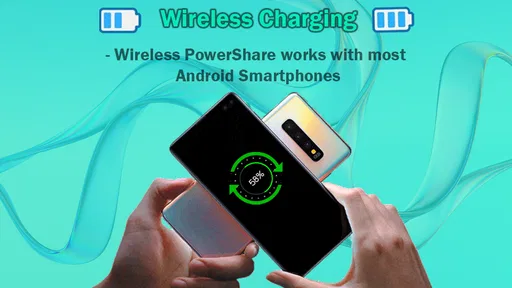
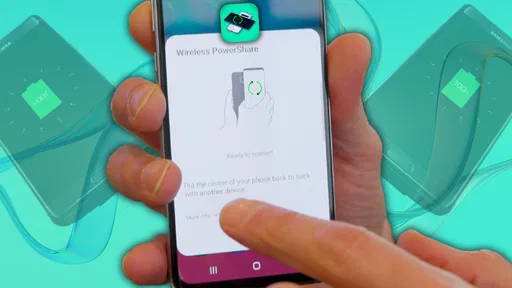
After opening Wireless Reverse Charging, I would use it as the starting point for the phone-to-phone arrangement rather than expecting a single tap to overcome hardware restrictions. The source phone must be placed with its charging area facing the receiving phone’s compatible charging area. The exact sweet spot varies between models, so I would move the devices slowly instead of assuming that their centers automatically line up.
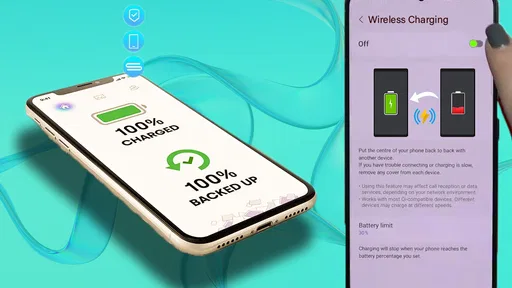
This is where the difference between a software instruction and a physical result becomes clear. The app can point me toward reverse charging, but the phones themselves decide whether energy actually transfers. If the source device has a system setting for battery sharing, that setting may still need to be enabled through the phone’s own controls. The app should therefore be viewed as a companion to the device feature, not as an independent power transmitter.
Once the phones are positioned, I would watch the receiving phone for its normal charging indication. That confirmation matters more than any animation inside an app. A visible charging symbol, a battery increase over time, or another system-level signal tells me that the handoff has really happened. If nothing changes, I would first adjust alignment, check the source phone’s reverse-charging option, and make sure neither device has moved.
There is a useful practical tip here: do not judge success instantly. Wireless power transfer can take a moment to establish, especially after the phones are repositioned. At the same time, I would not leave the phones stacked indefinitely without checking them. The source phone is also losing energy, and the exchange may be inefficient compared with using a cable or dedicated battery pack.
The handoff between the two phones
The handoff is the heart of this app’s use case. One device changes role from ordinary phone to power source, while the other becomes the receiver. That sounds simple, but it introduces several points where the process can become confusing.
First, the source phone needs enough charge to share. If it is also close to empty, using it as a donor may leave both phones in a poor position. I would reserve reverse charging for an emergency or for giving a small boost to the device that needs to remain reachable. It makes more sense to transfer enough power to send messages, make a call, display a ticket, or reach a safer location than to aim for a complete recharge.
Second, the receiving phone has to remain still. A normal cable creates a physical connection that is easy to see and relatively tolerant of movement. Wireless sharing is less forgiving. A pocket, a loose grip, or a small bump can break the alignment. For this reason, I would use a table, bench, or other steady surface whenever possible.
Third, both users need to understand which phone is doing what. This sounds trivial, but it is easy to place the devices in the wrong orientation when working quickly. I would identify the source phone first, activate its sharing feature if necessary, then place the receiver carefully. That order reduces the chance of repeatedly lifting and repositioning both devices.
Wireless Reverse Charging is helpful in this handoff because it keeps the task focused. It does not replace the phone’s own charging controls, but it gives the workflow a clear purpose. For someone who has never used reverse charging, that focus can be more approachable than searching through unrelated battery settings.
What happens when the result is successful
A successful result is not necessarily a dramatic battery jump. The practical win is that the receiving phone gains enough energy to remain useful. In an everyday emergency, a modest boost can be valuable if it keeps navigation active, allows a payment, or prevents an important call from being interrupted.
I would measure the outcome by the task I need to complete, not by expecting the source phone to behave like a wall adapter. Reverse wireless charging is naturally a trade-off: power leaves one phone and reaches another, with losses and interruptions possible along the way. That makes it a rescue method rather than an efficient routine charging habit.
This is also where I would set a personal stopping point. Once the receiver has enough energy for the immediate task, I would stop the transfer instead of trying to drain the donor. The source phone may be needed later, and preserving its remaining battery can be more important than squeezing out a little extra charge for the receiver.
For travelers, students, commuters, and people who carry two compatible phones, this limited outcome can still be worthwhile. A phone that gains just enough power to show a boarding pass or contact someone is more useful than a phone that shuts down completely. The app’s strongest scenario is therefore short-term continuity, not full battery recovery.
Where the workflow breaks down
The biggest weakness is the gap between the simple promise of wireless charging and the conditions required for it to work. The app cannot solve incompatible hardware, poor alignment, or a source phone that lacks enough energy. Users who expect the application to create reverse charging on any Android device are likely to be disappointed.
The minimum operating-system requirement is Android 7.0, which makes the app accessible to a broad range of devices. However, operating-system compatibility should not be confused with wireless reverse-charging compatibility. A phone can meet the software requirement and still lack the physical components or manufacturer support needed for power sharing.
Another point of friction is that the experience can vary between phone brands. System menus may use different names for battery sharing, and some devices may manage temperature, screen activity, or charging behavior differently. I would not assume that the same sequence works identically on every handset. If the app opens but the transfer does not begin, the phone’s own battery settings are the next place I would look.
Cases and accessories can also interfere. A thick protective case, a magnetic attachment, or a poorly positioned device may prevent the coils from coupling properly. Removing the case is not always convenient, especially outdoors, but it is a sensible troubleshooting step before deciding that the app is ineffective.
There is a broader trade-off compared with the usual alternatives. A cable is generally easier to confirm and keeps the phones physically connected. A power bank is more dependable for a longer recovery and does not sacrifice the battery of another phone. A wall charger is the better choice for regular charging. Wireless Reverse Charging becomes attractive when those options are unavailable and a compatible donor phone is already close at hand.
I would also skip it if I need predictable, unattended charging. The phones must stay aligned, and the source device is participating in the process. That makes it a poor choice for overnight charging, repeated daily use, or situations where I cannot keep an eye on the setup. It is also not ideal when the donor phone is needed for navigation, communication, or authentication during the same period.
Small habits that make the experience better
My first habit would be to test the arrangement before an emergency. Trying to discover reverse charging with a nearly dead phone creates unnecessary pressure. A short test at home can reveal whether the source phone supports the feature, where the charging coils line up, and whether a case needs to be removed.
My second habit would be to use the receiver’s battery percentage as the decision point. I would decide in advance what “enough” means for the situation, then stop once that target is reached. This avoids wasting the donor’s battery and keeps the exchange focused on a real outcome.
My third habit would be to keep the source phone’s display and movement under control where possible. Unnecessary use of the donor during transfer works against the purpose of sharing power. I would place both devices securely, avoid handling them repeatedly, and check the receiver only when needed.
A fourth useful insight is that wireless sharing should be considered a last-mile solution. If I am already near a café, car charger, outlet, or friend with a cable, that option is usually simpler. The app earns its place when the second phone is the only practical source and the receiver needs enough power to get through an immediate task.
How the app fits its audience
Wireless Reverse Charging has reached over five hundred thousand installs, and its average rating is 3.8 from around five thousand ratings. Those figures suggest that the concept attracts real interest while also reflecting the uneven experience caused by device compatibility and expectations. I read that combination as a reason to approach the app with realistic goals rather than as a guarantee that every phone will work.
Masivapp keeps the product in the utility-and-demonstration space, which suits its narrow purpose. The current version is 13.0, and the app is free, so trying it does not require a purchase decision. That makes it reasonable for someone who owns a potentially compatible phone and wants to explore whether phone-to-phone charging is practical in their setup.
I would recommend it to a person who regularly carries two phones, travels without a power bank, or wants a simple way to investigate reverse charging. I would also recommend it to someone who understands that the app depends on the phones’ hardware and system controls. In that context, it can be a useful companion for an emergency workflow.
I would not recommend installing it as a substitute for buying a charger. People who need reliable, fast, repeatable charging should choose a cable, wall adapter, or power bank instead. Likewise, anyone using an older or incompatible phone should verify the device’s wireless capabilities before expecting a result from the app.
My final take after following the complete flow
From the starting condition of a low battery, through source selection, alignment, system controls, and the final battery boost, Wireless Reverse Charging makes sense only when its role is understood correctly. It helps organize a phone-to-phone charging attempt, but it does not remove the physical requirements behind that attempt.
I like it most as an emergency companion. The useful result is not a full replacement for normal charging; it is keeping a phone alive long enough to finish something important. That distinction prevents most disappointment and makes the app’s narrow purpose clearer.
My recommendation is to try it if you already have compatible hardware and want a free fallback for short power emergencies. Test it in advance, keep the phones aligned, watch the receiving phone’s real charging indicator, and stop when the receiver has enough energy for the task. If dependable charging matters more than convenience in a particular moment, a cable or power bank remains the better choice.
Privacy and Permissions
See what permissions an app requests and how it handles your data.
- Wi-Fi connection information
- view Wi-Fi connections
- Other
- view network connections, full network access, prevent device from sleeping
Verdict
Strengths of Wireless Reverse Charging
- Conveniently tops up compatible earbuds, watches, or another phone without cables.
- Useful in emergencies when no charger or power bank is available.
- Works while traveling, commuting, or away from wall outlets.
- Simple to activate on supported devices through the battery settings.
- Avoids carrying separate charging cables for small accessories.
Limitations of Wireless Reverse Charging
- Charging is slower than using a wired connection.
- The phone battery drains quickly while sharing power.
- Device alignment can be difficult during wireless charging.
- Not all phones and accessories support reverse wireless charging.
- The phone may heat up during extended power sharing.
Other Releases by Masivapp
View All
Wireless charge Phone to Phone
Libraries & Demo4.1
Similar Picks in This Category
View All
PGT: GFX, Launcher & Optimizer
Trilokia Inc.4.5

AusweisApp Bund
Governikus Service GmbH3.7

Cardboard
Google LLC3.2

Gamers GLTool with Game Tuner
Trilokia Inc.4.5

Multi Web Chat - Read Secretly
World Scan & Cleaner3.8

App Cloner Premium & Add-ons
App Listo1.9
Frequently Asked Questions
What is Wireless Reverse Charging and how does it work?
Wireless Reverse Charging turns a compatible smartphone into a small wireless charging pad. After enabling the feature in the phone’s battery or quick settings menu, you place another Qi-compatible device, such as earbuds or a second phone, on the back of the host device. The host phone transfers power wirelessly, although charging is usually slower than using a wall charger.
Which phones and accessories are compatible with Wireless Reverse Charging?
Compatibility depends on the hardware, not only on the app or setting that activates the feature. The host phone must include reverse wireless charging support, while the receiving device generally needs to support the Qi wireless charging standard. Some phone cases, metal accessories, magnetic mounts, or unusual camera designs can prevent a stable connection, so removing thick cases may be necessary.
How do I enable Wireless Reverse Charging on my Android or iPhone?
On supported Android phones, the option is commonly found under Settings, Battery, or Connected Devices, and may be called Wireless PowerShare, Battery Share, or Reverse Wireless Charging. iPhones do not generally offer a user-accessible feature for wirelessly charging another device from the back. Menu names and availability vary by model, region, and software version.
Does Wireless Reverse Charging drain the phone battery quickly?
Yes, using Wireless Reverse Charging consumes the host phone’s battery, and the amount lost is normally greater than the energy received by the other device because wireless power transfer is not perfectly efficient. It is best used for emergencies or topping up accessories rather than fully charging another phone. Many devices also stop automatically at a selected battery level.
Is Wireless Reverse Charging safe for the phone and the receiving device?
When both devices support compatible wireless charging standards, the feature is generally safe because built-in controls monitor temperature, power output, and battery levels. However, the phone may become warm during use, especially if the alignment is poor or a thick case remains attached. Stop charging if either device becomes unusually hot, and avoid using the feature near liquids or metal objects.
